
History
The project’s journey reflects the broader shifts in Linux development: a focus on minimalism in an era of increasingly resource-heavy operating systems, community-driven improvements, and alignment with Ubuntu’s LTS cycles (typically every two years, with Bodhi releases following a few months later). Early versions emphasised rapid iterations, while later ones shifted to more stable, less frequent updates. Challenges included forking the desktop environment due to upstream instability in Enlightenment and porting efforts for ARM architecture. Despite its niche appeal, Bodhi maintains an active community through forums like bodhilinux.boards.net, where users contribute to testing and variants like the “deBodhi” beta.
[14] [7]
Early Years: Foundation and Rapid Growth (2011–2012)
Bodhi Linux’s story began in early 2011 when Jeff Hoogland sought to create a distribution that combined the elegance of the Enlightenment DR17 (E17) desktop with Ubuntu’s reliability, but stripped down to essentials. The initial releases focused on minimalism: only core tools like a file manager (initially PCManFM, later Thunar), a terminal, and a web browser were included, allowing users to install software via APT or a simple app store.
- Version 0.1.6 (February 2011): The very first alpha-like release, marking Bodhi’s debut as an experimental lightweight distro based on Ubuntu 10.04 LTS. It was unsupported and primarily for testing E17 integration.
- Version 0.1.7 (March 2011): A quick follow-up with bug fixes; still pre-stable.
- Version 1.0.0 (March 2011): Official stable launch on March 26, 2011. Introduced the core minimalist philosophy, low system requirements (e.g., 128MB RAM initially, later refined), and E17 as the default desktop. It gained attention for reviving old hardware.
- Version 1.1.0 (May 2011): Added more themes and modules for E17 customisation.
- Version 1.2.0/1.2.1 (September/October 2011): Improved stability and introduced better hardware support.
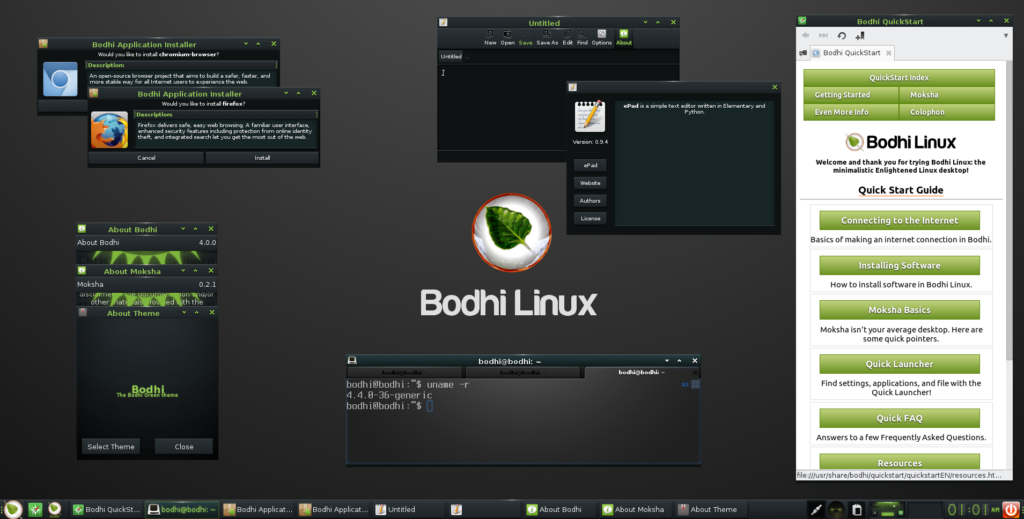
- Version 1.3.0 (December 2011): Enhanced E17 features like animations and gadgets.
- Version 1.4.0 (March 2012): Focused on user feedback, adding more configuration options.
- Version 1.5.0 (June 2012): The final update on the Ubuntu 10.04 base, with polished E17 tools.
These early versions followed a rapid 3-month update cycle, building a loyal user base among enthusiasts tired of heavier distros like full Ubuntu or Fedora.
Maturation and Stability Focus (2012–2015)
By 2012, Bodhi shifted to Ubuntu 12.04 LTS as its base, extending support lifecycles to five years. This period saw the introduction of update releases (x.y.z) for incremental improvements, reducing frequency from version 2.4.0 onward to three times a year. The team emphasised community involvement and began addressing E17’s limitations.
- Version 2.0.0 (July 2012): First on Ubuntu 12.04; improved app store and E17 modules.
- Version 2.1.0 (September 2012): Bug fixes and theme enhancements.
- Version 2.2.0 (December 2012): Better multimedia support.
- Version 2.3.0 (March 2013): Performance optimizations.
- Version 2.4.0 (September 2013): Last on 12.04; shifted to slower update pace for stability.
- Version 3.0.0 (February 2015): Based on Ubuntu 14.04; refined minimalist install process.
A major milestone came in 2015 when upstream changes in Enlightenment (post-DR17) introduced instability. The Bodhi team forked E17 into Moksha, a stable, feature-enhanced desktop written in C and Python, focusing on modularity and low overhead.
- Version 3.1.0 (August 2015): Debut of Moksha Desktop, addressing E17 bugs and adding Bodhi-specific tools.
- Version 3.2.0 (March 2016): Moksha refinements and better hardware compatibility.
Modern Era: LTS Alignment and Hardware Expansion (2016–2023)
From version 4.0 onward, Bodhi aligned more closely with Ubuntu LTS, targeting July releases every two years. System requirements were formalized (512MB RAM, 5GB disk, 500MHz CPU), with legacy support for 32-bit non-PAE systems. This era also saw experimental ports, like R_Pi Bodhi Linux for Raspberry Pi, built on Raspbian and ported from Debian Wheezy for ARMv6 optimization—a challenging effort due to architecture differences.
- Version 4.0.0 (October 2016): On Ubuntu 16.04; Moksha updates for better animations.
- Version 4.1.0 (January 2017): Quick fixes post-launch.
- Version 4.2.0 (May 2017): Enhanced themes.
- Version 4.3.0 (August 2017): Performance tweaks.
- Version 4.4.0 (December 2017): Stability improvements.
- Version 4.5.0 (February 2018): Final on 16.04.
- Version 5.0.0 (August 2018): Ubuntu 18.04 base; new default themes and AppCenter.
- Version 5.1.0 (March 2020): Updated to Ubuntu 18.04.4; COVID-era release with remote work optimizations.
- Version 6.0.0 (May 2021): On Ubuntu 20.04.2; refined Moksha (version 0.3.x) for lower RAM usage (under 200MB idle).
- Version 7.0.0 (August 2023): Based on Ubuntu 22.04; modernized look, better HiDPI support, and community beta testing via “deBodhi.”
Current Status and Future (2024–2026)
As of 2026, Bodhi Linux remains actively maintained, with version 7.0.0 still supported until 2027. No new major releases have been announced post-2023, but the team continues point releases and community-driven variants. The focus persists on minimalism, with updates delivered via APT rather than full reinstalls. Bodhi’s legacy endures in inspiring other lightweight distros, proving that efficiency and elegance can coexist in open-source computing.
[1] [2] [14]
Boghi Linux Versions
| Version | Release Date | Ubuntu Base | Key Changes/Features | Support End |
|---|---|---|---|---|
| 1.0.0 | 01/03/2011 | 10.04 | Initial stable release with E17 | Unsupported |
| 2.0.0 | 01/07/2012 | 12.04 | LTS alignment, app store | 01/04/2017 |
| 3.0.0 | 01/02/2015 | 14.04 | Minimalist refinements | 01/04/2019 |
| 3.1.0 | 01/08/2015 | 14.04 | Moksha fork debut | 01/04/2019 |
| 4.0.0 | 01/10/2016 | 16.04 | Moksha enhancements | 01/04/2021 |
| 5.0.0 | 01/08/2018 | 18.04 | New themes, AppCenter | 01/04/2023 |
| 6.0.0 | 01/05/2021 | 20.04 | Low RAM optimizations | 01/04/2025 |
| 7.0.0 | 01/08/2023 | 22.04 | HiDPI support, beta testing | 01/04/2027 |